As an Amazon Associate I earn from qualifying purchases.
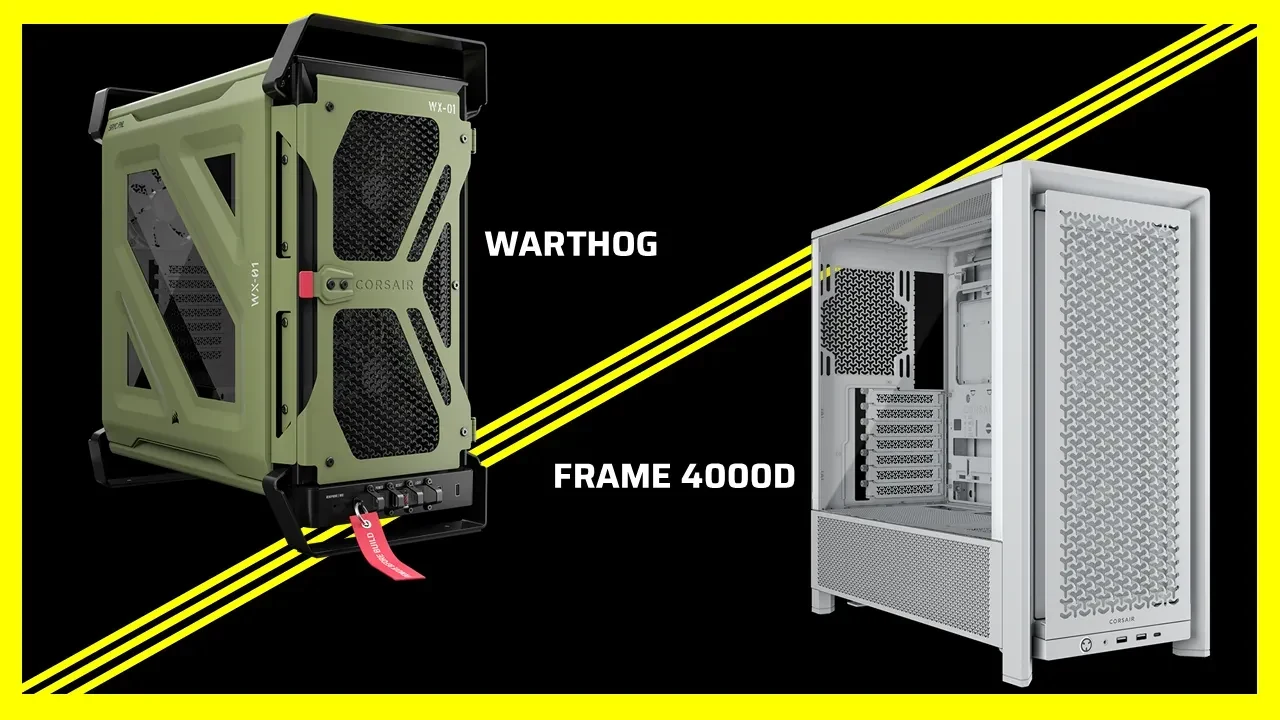
Choose the WARTHOG first if keeping a CPU cooler taller than 170mm is the deciding factor. Choose the FRAME 4000D first if you need the published 220mm PSU allowance or more dedicated 2.5-inch drive positions. Neither case wins every part of a migration: the WARTHOG has the larger exterior and taller cooler allowance, while the FRAME 4000D lists the longer PSU limit and more SSD mounts.
The useful comparison starts with the parts you already own. A case that saves you from replacing an expensive cooler may be the better purchase even if it occupies more desk space. A case that accommodates your power supply but forces a storage change may solve only half the problem. Work through the constraints together before ordering.
Start with a Keep-or-replace Inventory
Record your cooler's installed height, the PSU body's length, the graphics card's length and thickness, and every SATA drive you intend to move. Separate 3.5-inch hard drives from 2.5-inch SSDs. Then record planned front cooling, because a front fan or radiator assembly occupies space along the same general direction as the graphics card.
For the cooler, use the height with its fan in the position you actually need. If tall memory requires the front fan to sit higher, the cooler's lowest advertised configuration may no longer describe your assembly. For the PSU, keep the body measurement separate from the room needed for modular plugs and cable routing. A published length limit is an initial filter, not a drawing of your finished cable bundle.
Mark each part as essential to retain, inexpensive to replace, or optional. This prevents a secondary preference, such as an extra lighting controller location, from outweighing a hard mechanical mismatch.
Compare the Dimensions That Change the Purchase
CORSAIR's side-by-side specification table gives the following starting points.
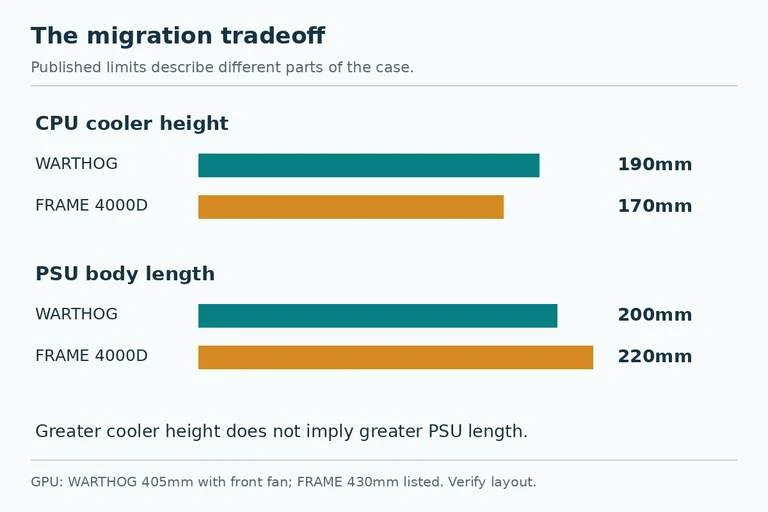
| Migration constraint | WARTHOG | FRAME 4000D | What changes your decision |
|---|---|---|---|
| Maximum CPU cooler height | 190mm | 170mm | A retained cooler above 170mm favors WARTHOG |
| Maximum PSU body length | 200mm | 220mm | A PSU above 200mm rules out WARTHOG on this table |
| Listed 3.5-inch bays | 2 | 2 | Neither adds a third listed HDD bay |
| Listed 2.5-inch bays | 2 | 4 | FRAME offers more listed SSD positions |
| GPU length | 405mm with front fan | 430mm listed | Keep the front-cooling condition attached |
| Exterior, L × W × H | 546 × 284 × 534mm | 490 × 239 × 486mm | Check furniture and access space |
Treat the drive entries as the manufacturer's listed mounting provision. Before assuming that every listed position remains usable with your intended accessories, check the installation arrangement. A bay count alone does not show connector access, a controller occupying a plate, or cables passing through the same space.
There is also a reason to retain the exact GPU wording. The comparison table specifies 405mm for WARTHOG with a front fan, but the same article later broadly describes both cases as accommodating up to 430mm. Use the conditional 405mm figure to screen a WARTHOG build with front fans, and resolve any longer-card proposal against the exact installation documentation. Do not use the broader sentence to erase that condition.
When the Tall Cooler Should Decide
For example, imagine you want to retain a 180mm-tall cooler, a 180mm PSU, two HDDs, and one 2.5-inch SSD. The cooler exceeds FRAME 4000D's listed height but falls within WARTHOG's. The other inventory items do not exceed the corresponding published limits. WARTHOG is therefore the stronger candidate for this migration, subject to the remaining layout checks.
Now add tall RGB memory that requires raising the cooler fan. Recalculate the installed height before treating the original 180mm as final. You need the highest point of the assembled cooler to remain within the case allowance, with the panel closing normally.
This is a reason to measure the retained assembly before buying a new chassis. Replacing RAM, changing the cooler fan arrangement, or replacing the cooler are different purchases. Decide deliberately which one is acceptable rather than discovering the dependency during the move.
When the PSU or SATA Drives Should Decide
A hypothetical 210mm PSU immediately changes the comparison. It is longer than WARTHOG's published 200mm allowance and within FRAME 4000D's published 220mm allowance. A taller exterior does not give WARTHOG a longer listed PSU compartment. Leave it off the shortlist unless you are prepared to change the supply.
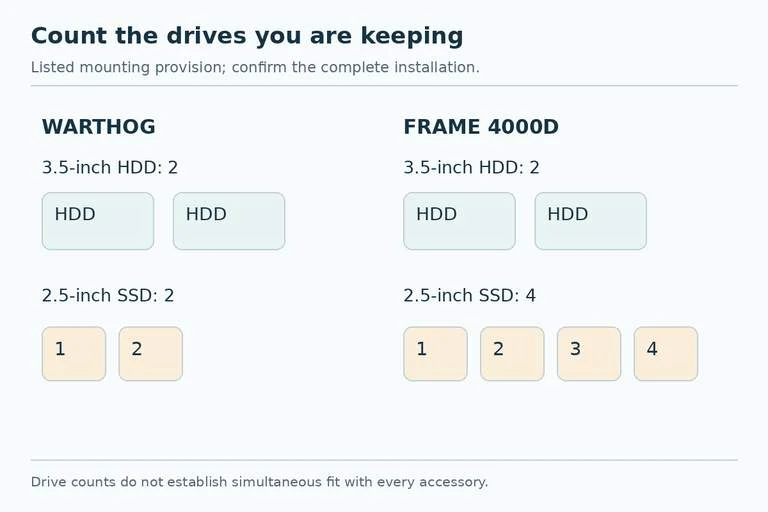
With storage, count enclosures rather than just total capacity. Four separate 2.5-inch SATA SSDs need four suitable mounting positions, plus power and data connections. FRAME's four listed positions are the better starting point than WARTHOG's two. Two 3.5-inch HDDs fit the listed count of either case; three exceed both published counts.
Suppose you need the 180mm cooler from the earlier example and four SATA SSDs. One case accommodates the cooler on paper; the other offers the stronger SSD mounting provision. Neither is an automatic complete answer. Price the specific compromise: a shorter cooler, a different storage arrangement supported by the case, or another chassis. Buying the case first only postpones this decision.
Check the Modular Features You Will Actually Use
Both cases support reverse-connector motherboards and have removable motherboard trays. Those are useful migration features, but neither substitutes for confirming your board's exact fit and cable openings. Both also offer side fan rails and removable PSU shrouds with two 120mm fan positions. Removing a shroud changes the available mounting arrangement, so include it in the layout you check.
Their side treatment differs. FRAME 4000D offers a choice involving its side cover and fan rail; WARTHOG comes with the fan rail without that side shroud. Behind the CPU area, WARTHOG's mounting plate adds provision for an iCUE LINK four-way signal splitter alongside the hub location described for both cases. These details matter if you are moving an existing controller layout. They are secondary if the cooler or PSU already fails a limit.
Make the Order Around One Complete Configuration
Write the final proposed build on one line: case variant, installed cooler height, PSU length, retained drives, graphics card, and front cooling. Then verify that configuration, including cable access and the mounting pieces supplied with the exact case SKU. CORSAIR's comparison lists no included fans for the variants in its table; do not assume every retail bundle has the same contents.
WARTHOG makes the clearest case when extra cooler height preserves a part you value. FRAME 4000D (black, fanless CC-9011290-WW) makes the clearest case when PSU length or additional SATA SSD mounts preserve the rest of your build. The right purchase is the one that clears your entire keep list with the fewest unwanted replacement parts.