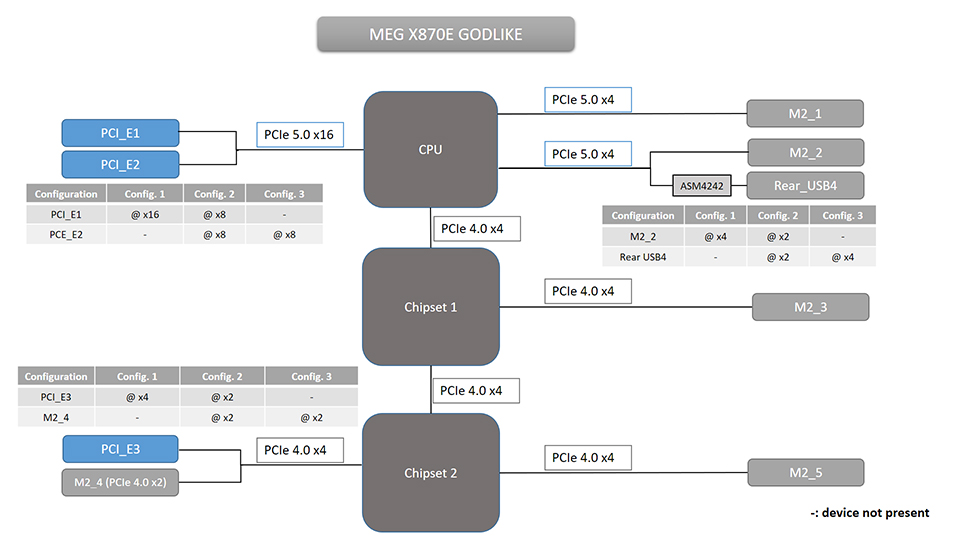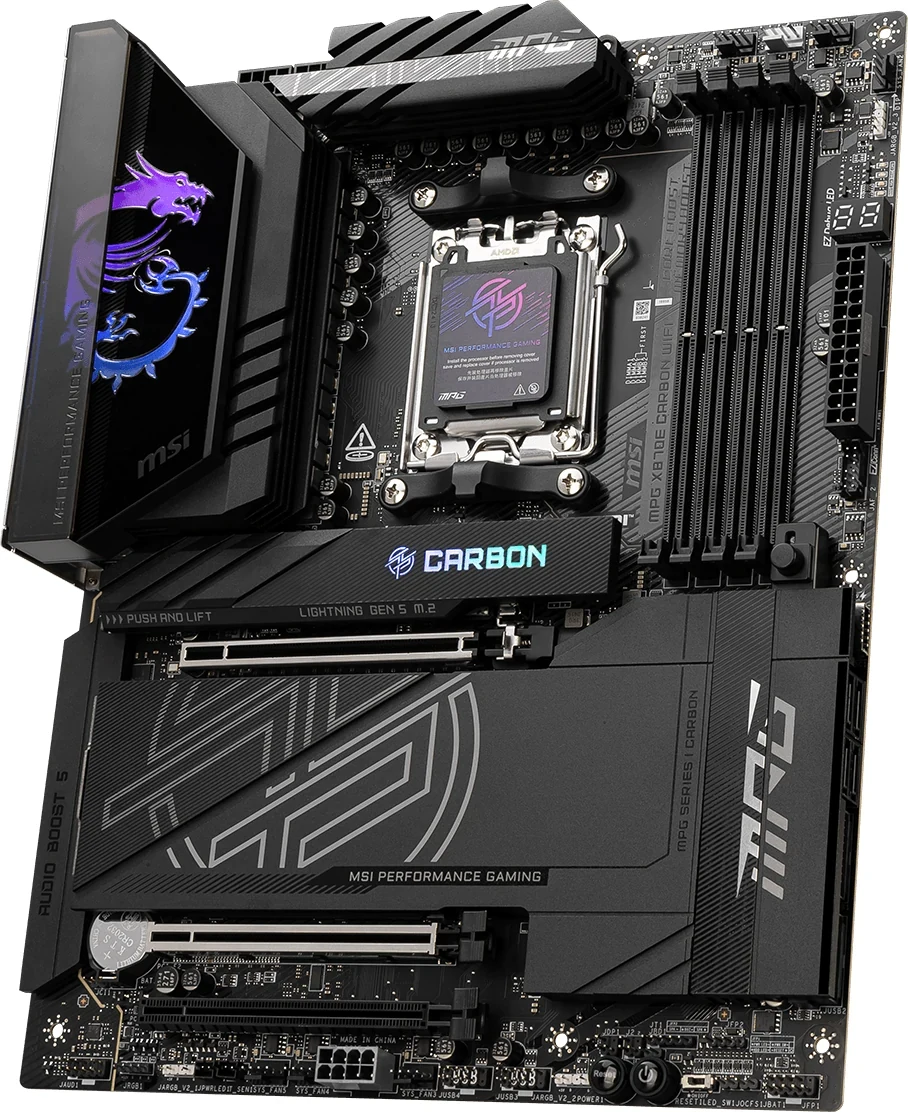
With a Ryzen 7000 or 9000 processor, MPG X870E CARBON WIFI can allocate x8 to the GPU, x4 to a second CPU-connected card and x4 to M2_2, while M2_1 supplies the other Gen 5 SSD connection. MEG X870E GODLIKE separates its two CPU card slots from the M2_2/USB4 sharing pair: two CPU cards receive an x8/x8 allocation, but using M2_2 alongside rear USB4 reduces that SSD's link to x2. Giving M2_2 its full x4 allocation disables the rear USB4 ports.
Neither answer comes from counting long card connectors or advertised SSD positions. Carbon's second Gen 5 SSD competes with the GPU lane pool; Godlike's competes with USB4. Godlike also has a separate lower-slot conflict when its fifth onboard SSD position is used. Choose the complete assignment your retained components need before paying for either board.
1. Map the Onboard Drives Before Counting Expansion Capacity
Both boards have four SATA 6Gb/s ports. Carbon has four onboard M.2 slots; Godlike has five, plus an accompanying expansion card with two more SSD positions. Those two card-mounted positions consume expansion capacity and have their own restrictions. They are not another two sockets on the motherboard.
The table gives the onboard PCIe links for Ryzen 7000/9000. Every speed is an up to link specification, with sharing applied below. “CPU” and “chipset” describe the connection, not a measured application-speed ranking.
| Onboard position | Carbon | Godlike |
|---|---|---|
| M2_1 | CPU Gen 5 x4; 2260/2280 | CPU Gen 5 x4; 2260/2280 |
| M2_2 | CPU Gen 5 x4; 2260/2280; shares GPU/card pool | CPU Gen 5 x4; 2260/2280; shares USB4 pool |
| M2_3 | Chipset Gen 4 x4; 2280/22110 | Chipset Gen 4 x4; 2280/22110 |
| M2_4 | Chipset Gen 4 x4; 2260/2280 | Chipset Gen 4 x2; 2260/2280; shares lower card slot |
| M2_5 | Not present | Chipset Gen 4 x4; 2260/2280 |
A retained 22110 SSD belongs in M2_3 under these length specifications, not whichever empty socket is easiest to reach. A common 2280 drive fits the listed length options across both boards, but its protocol, heatsink and available link still need matching. Do not read “five M.2” as five equivalent Gen 5 x4 connections.
Godlike's broad covers conceal several storage positions, as the manufacturer view shows. Removing a cover reveals a physical socket; it does not remove a sharing rule. Use the printed M2_ names for your plan rather than counting visible heatsink panels.
2. Carbon: Two Gen 5 Drives and a CPU Card Mean an x8 GPU Allocation
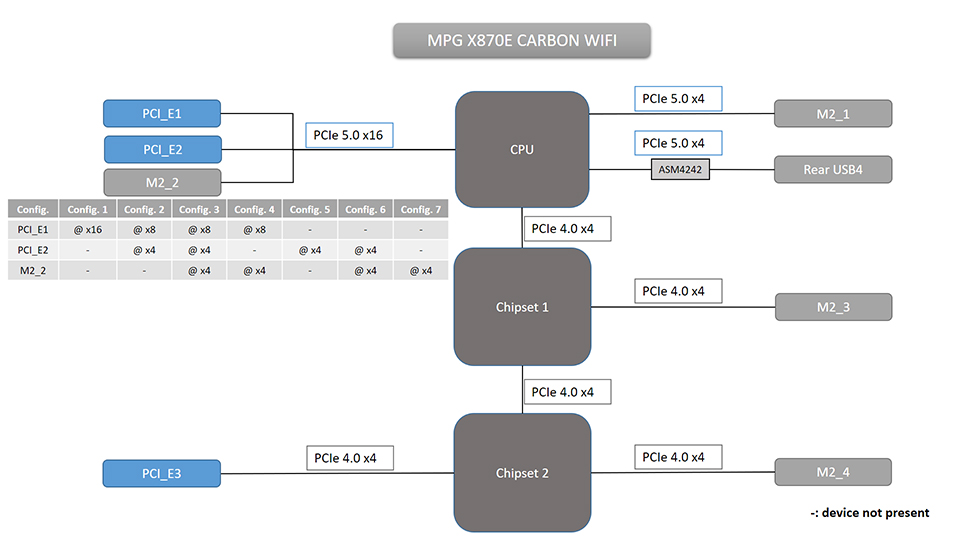
Carbon's PCI_E1, PCI_E2 and M2_2 share the CPU's x16 lane pool. M2_1 is a separate CPU-connected SSD position. Its lower PCI_E3 is chipset-connected at up to Gen 4 x4, and MSI does not list it as directly sharing with M2_3 or M2_4. Rear USB4 has no sharing partner listed in this board's resource map.
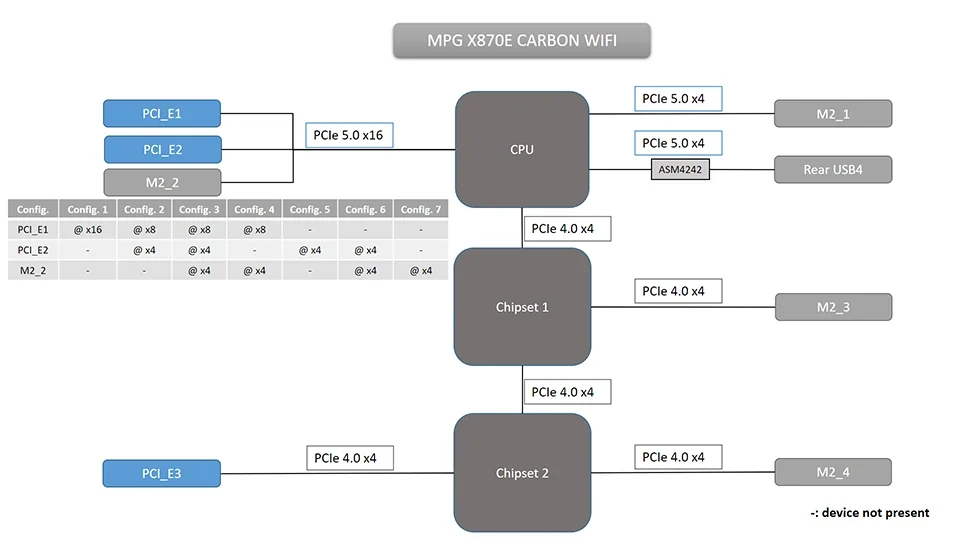
The original manual's Ryzen 7000/9000 matrix shows two key allocations: PCI_E1 at Gen 5 x16 with PCI_E2 and M2_2 unavailable, or PCI_E1 at Gen 5 x8 with PCI_E2 and M2_2 each at Gen 5 x4. This resolves the important three-device question that separate “up to” specifications leave unanswered.
For example, put the GPU in PCI_E1, a retained CPU-connected x4 card in PCI_E2, and the two Gen 5 SSDs in M2_1 and M2_2. The allocation is GPU x8, card x4 and two SSD links up to x4 each. Carbon's M2_3 and M2_4 remain listed at Gen 4 x4 for additional onboard storage. That is a documented four-onboard-drive plan without taking lanes from the named USB4 path; it is not a promise of unlimited simultaneous throughput.
If the retained card can use a chipset-connected Gen 4 x4 slot, PCI_E3 is another candidate location. Moving it there does not restore a full x16 GPU allocation while retaining M2_2: that SSD still belongs to the shared CPU pool. Conversely, keeping the GPU's x16 allocation means leaving both PCI_E2 and M2_2 unused in the manual's matrix. Your second onboard SSD could instead use a Gen 4 position, but that changes the requirement from two Gen 5 links.
The topology diagram explains the electrical relationships. It does not establish whether your GPU cooler leaves PCI_E2 or PCI_E3 physically accessible, or whether your card accepts the available generation, width and upstream connection.
3. Godlike: Separate the Three Sharing Decisions
Godlike has three distinct resource decisions. First, PCI_E1 and PCI_E2 share the CPU's x16 card lanes, offering x16/x0 or x8/x8 with Ryzen 7000/9000. A retained x4 card can use a compatible wider slot, but an x8 allocation does not turn that card into an x8 device. Using both CPU slots also means the GPU is no longer allocated x16.
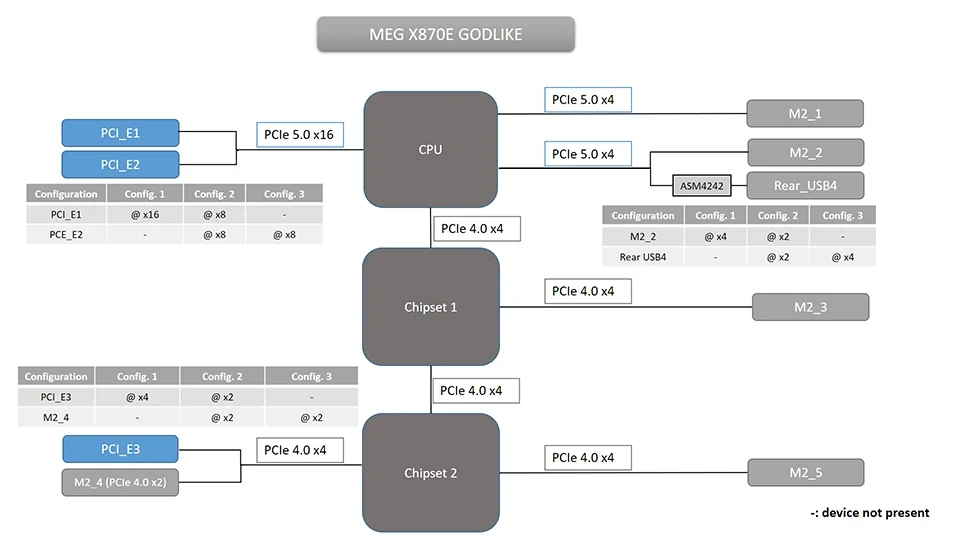
Second, M2_2 shares with the rear USB4 controller path. MSI describes a CPU Gen 5 x4 pool split to x2/x2 when M2_2 is populated. M2_1 remains the separate Gen 5 x4 SSD position. If you want both onboard Gen 5 SSD links at x4, MSI provides a BIOS choice giving M2_2 x4, which disables the rear USB 40Gbps Type-C ports. If those ports are essential, retain their shared mode and accept M2_2's x2 allocation.
These labels describe upstream PCIe allocation. They do not make the USB connectors 80Gbps ports: MSI lists the USB4 host at a maximum PCIe 4.0 x4 connection and the rear ports as USB 40Gbps. Neither the diagram's CPU Gen 5 label nor a connector count proves a particular simultaneous storage-transfer rate.
Third, M2_4 shares with the chipset-connected PCI_E3 slot. Installing a drive in M2_4 reduces PCI_E3 to x2. Forcing PCI_E3 to x4 in BIOS disables M2_4; it does not create a second independent x4 connection. M2_4 itself is listed at Gen 4 x2, not x4.
For a retained lower-slot card that genuinely requires electrical x4, use M2_1, M2_2, M2_3 and M2_5 for four onboard SSDs, leaving M2_4 empty. Account separately for M2_2's USB4 choice. Adding a fifth onboard SSD in M2_4 changes the lower card's allocation to x2, so it works only if that card and your workload accept that connection. Alternatively, moving the card to PCI_E2 changes the CPU-card layout and GPU allocation; it is not a free extra slot.
4. a Retained Ryzen 8000 Processor Changes the Purchase
The two-Gen-5-drive plans above apply to Ryzen 7000/9000. Socket AM5 compatibility does not preserve their lanes when you move a Ryzen 8000 processor into either board. Both boards list M2_1 at Gen 4 x4 with that processor family.
| Processor group | Carbon limits | Godlike limits |
|---|---|---|
| Ryzen 7000/9000 | CPU pool: GPU x16 alone, or x8 plus PCI_E2 x4 and M2_2 x4 | CPU card slots x16/x0 or x8/x8; separate M2_2/USB4 sharing |
| Ryzen 8700 / 8600 / 8400 series | GPU up to Gen 4 x8; PCI_E2 and M2_2 unavailable | GPU up to Gen 4 x8; PCI_E2 unavailable; M2_2 listed up to Gen 4 x4 with sharing to consider |
| Ryzen 8500 / 8300 series | GPU up to Gen 4 x4; PCI_E2 and M2_2 unavailable | GPU up to Gen 4 x4; PCI_E2 and M2_2 unavailable; USB4 upstream link limited to PCIe 4.0 x2 |
On Carbon, neither Ryzen 8000 group restores the second CPU card slot or M2_2 through a BIOS split. Godlike retains M2_2 support for the 8700/8600/8400 group, but that is a Gen 4 specification, not the Gen 5 x4 mode described earlier. Do not apply a Gen 5 BIOS allocation literally to that different CPU.
For a build retaining one of these CPUs, reconsider which requirement is fixed: the CPU, two Gen 5 links, or a second CPU-connected card. Buying the more elaborate board does not satisfy all three. Verify the exact processor's current support and required BIOS as well as its family-level lane restrictions before ordering.
5. Godlike’s Seven-drive Count Includes a Card You Must Accommodate
The M.2 XPANDER-Z SLIDER GEN5 adds two 2280 SSD positions. MSI's original manual specifies these SSDs as data disks, with operating speed dependent on the motherboard PCIe slot. It also says the card does not support SSDs with their own heatsinks or hot-plugging its M.2 enclosure. Do not plan the card's drives as your boot-drive solution from a seven-drive headline.
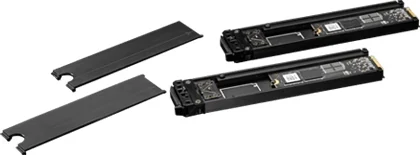
The removable trays in the manufacturer illustration show why this is a separate assembly. The card has its own cooling arrangement and a 6-pin PCIe power connection; the manual's installation sequence connects that power after installing the card. Inventory the correct PSU cable and room for the complete card, not just two extra SSDs.
If the GPU and another retained card already occupy PCI_E1 and PCI_E2, the Xpander cannot also occupy either connector. A spare lower PCI_E3 label is not proof that it supplies the card's advertised two-drive Gen 5 configuration. Its chipset Gen 4 link, lane width and M2_4 sharing differ. Resolve the chosen slot's operating mode and the card's requirements before counting both SSDs as usable additions.
For a straightforward four- or five-drive onboard plan, the expansion card need not determine the purchase at all. For six or seven drives, it becomes part of the complete card-slot, power and data-only storage assignment. There is no basis here for promising seven drives at their individual maximum speeds alongside arbitrary other cards.
6. Check Board Width, Slot Access and SSD Heatsinks Together
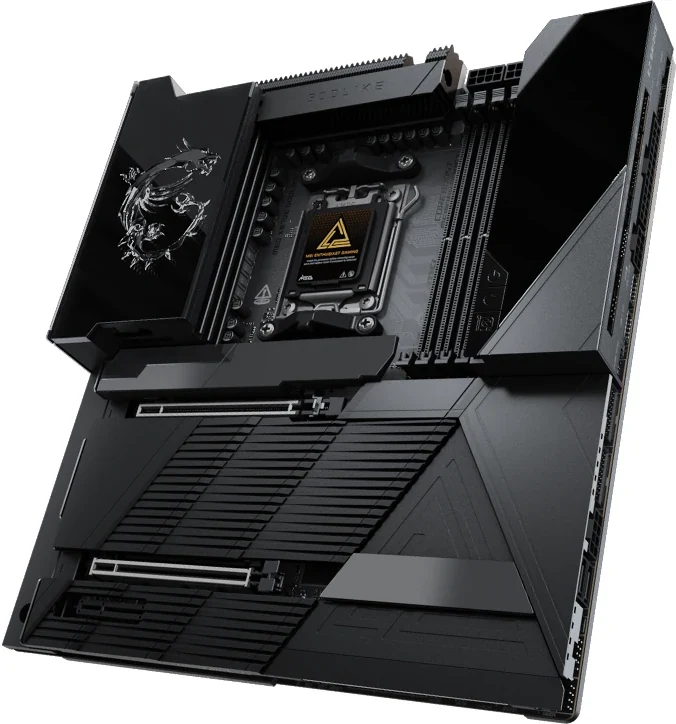
Carbon is 244 × 305 mm ATX; Godlike is 277 × 305 mm E-ATX. Check your case's stated support for the actual dimensions, cable openings and installed components. The extra board width can matter to a migration even when the case specification uses the broad E-ATX label. A bare-board photo also cannot guarantee that a thick GPU leaves the intended second connector usable.
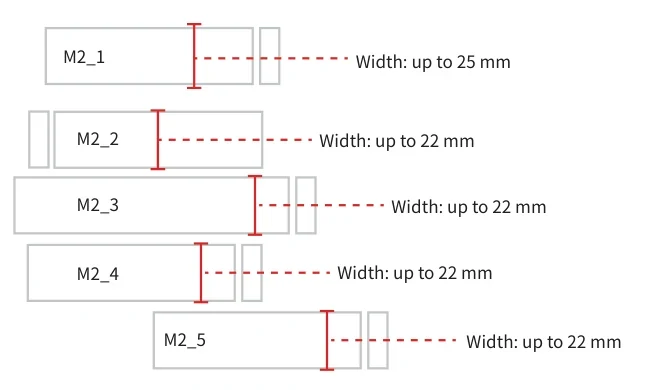
The Godlike clearance drawing identifies the five onboard M.2 positions and gives SSD-heatsink width limits: 25 mm at M2_1 and 22 mm at the other four. Carbon lists 24 mm at M2_1 and 22 mm at the other three. Both manuals also require considering the installed PCIe card's height when assessing M.2 space. These width limits are not a blanket approval for any heatsink height.
For an SSD with its own heatsink, follow the relevant manual's instruction to remove the M.2 plate or rubber cube and not reinstall the motherboard-supplied heatsink on top. Match the SSD's actual dimensions to its assigned position. A lane-compatible drive that conflicts physically with a card or cover still prevents the planned build. The Xpander's separate prohibition on SSDs with heatsinks remains applicable to its trays.
Both motherboards have four DDR5 slots with up to 256GB specified and support non-ECC, unbuffered memory. That does not guarantee an old kit's overclocked speed with a new CPU or four-module configuration. Check the exact kit, CPU and compatibility list rather than making memory retention another consequence of the board's headline maximum.
7. Inventory USB Ports and Front-panel Power Separately
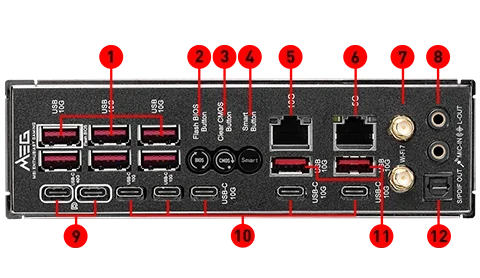
Godlike has more rear Type-C connections, but most are 10Gbps, not USB4. Its two rear USB4 ports are the ones affected by the M2_2 choice. Carbon's rear USB4 path is outside its named M2_2/GPU/card sharing group. The actual rear panel helps distinguish those groups before assigning storage devices and cables.
| USB inventory | Carbon | Godlike |
|---|---|---|
| Rear Type-A | Nine 10Gbps | Eight 10Gbps |
| Rear Type-C | Two 10Gbps plus two USB4 40Gbps | Five 10Gbps plus two USB4 40Gbps |
| Front Type-C support | One 20Gbps; PD up to 27W | One 10Gbps plus one 20Gbps; latter PD up to 60W with required power |
| Other front USB capacity | Four 5Gbps plus four USB 2.0 | Four 5Gbps plus four USB 2.0, including two via EZ BRIDGE |
Front-port capacity needs matching case ports and cables. Godlike's JUSBC2 needs PD_PWR1 connected to the PSU for its specified 60W charging. A data cable alone does not establish that power capability. Its USB 2.0 total also includes connections on EZ BRIDGE, rather than four ports supplied solely by an ordinary mainboard header.
Treat data speed, charging and display as separate requirements. Both boards' USB4 display support depends on a processor featuring integrated graphics. A Type-C shape, a PD rating or several nominally fast ports does not establish your display path or simultaneous external-drive throughput.
8. Choose the Complete Layout You Can Retain
Choose Carbon when its GPU x8, CPU card x4, M2_1/M2_2 Gen 5 x4 assignment meets the plan and you want its separate USB4 path. It also supplies two onboard chipset Gen 4 x4 SSD positions without Godlike's M2_4/lower-slot pair. Confirm the card's physical access and acceptance of x4 before treating the assignment as settled.
Choose Godlike when its x8/x8 CPU-card allocation, fifth onboard SSD position or actual port inventory serves your components. Make the two storage decisions explicit: whether M2_2 may run at x2 to retain USB4, and whether a drive in M2_4 may reduce the lower slot to x2. If you need full x4 at both M2_2 and PCI_E3, rear USB4 must be disabled and M2_4 left unused under the documented choices.
Write one final connector list for the GPU, retained card and every drive, then add the CPU group, USB4 mode, case dimensions and necessary power cables. That list is the useful purchase comparison. Neither board's collection of maximum specifications establishes a faster or more compatible complete system on its own.